
Five hidden document properties, no announcement, and a week of “we’ve shared it internally”
Last Saturday (October 18th) I was testing some Protégé exports for a project at the firm, and out of old law librarian habit I opened one of the Word files and went to File > Info > Properties > Advanced Properties. Sitting on the Custom tab were five properties I had never seen before.
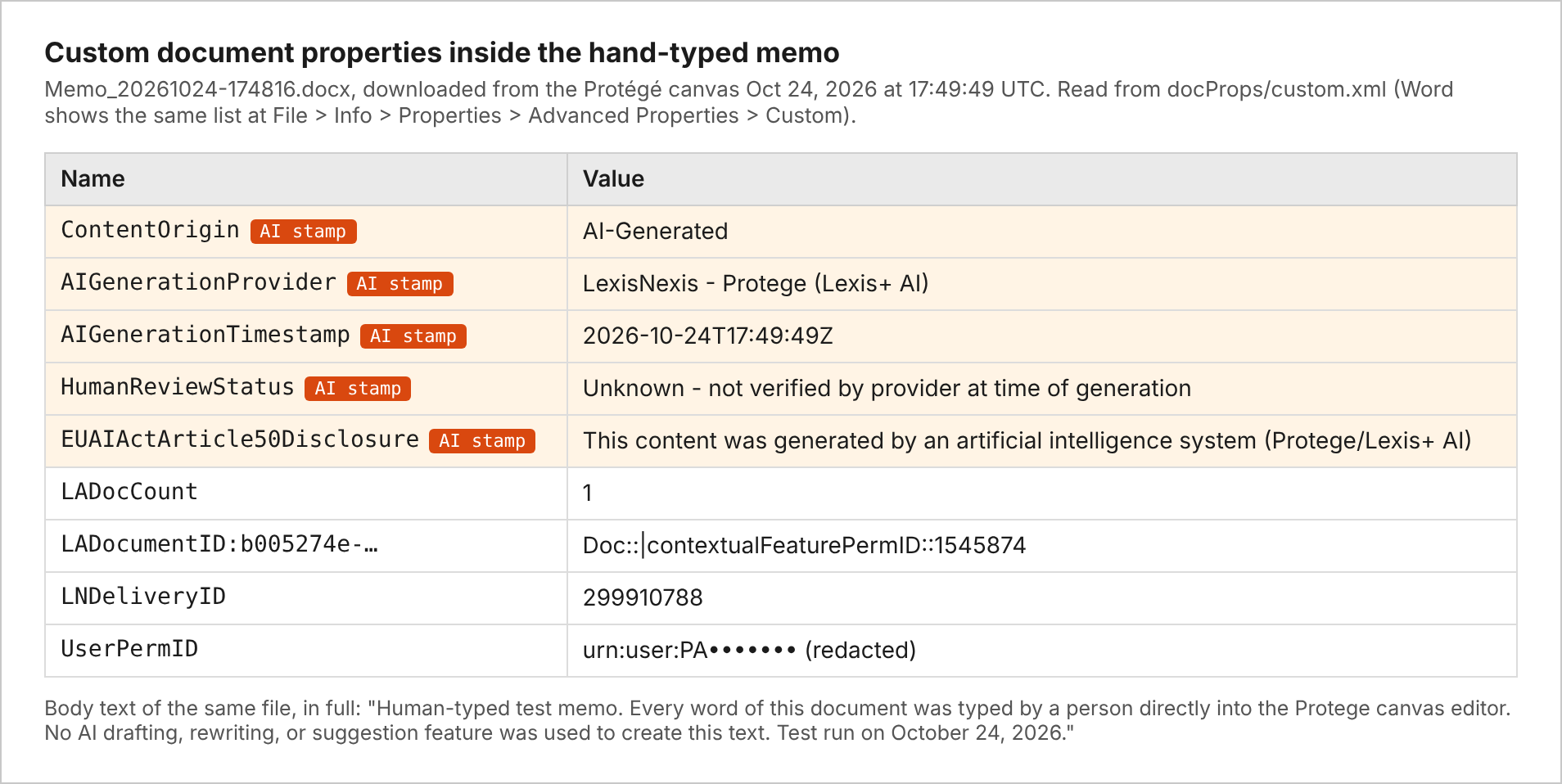
Lexis is writing these into the Word, Excel, PowerPoint and PDF files that come out of Protégé. The file says it is “AI-Generated,” names “LexisNexis – Protege (Lexis+ AI)” as the provider, sets a human review status of “Unknown – not verified by provider at time of generation,” and adds a disclosure line citing Article 50 of the EU AI Act. Protégé doesn’t mention any of this on screen, and the download dialog has no setting for it.
As far as I can find, LexisNexis has never told its customers about it. (This was validated in my follow up calls with Lexis representatives.) I searched the release notes, the help pages, the terms of use and the May launch announcement for Lexis+ with Protégé, and didn’t find a word about it.
It’s also been going on longer than I realized. After I flagged this inside the firm, one of our researchers sent me a Protégé answer that had been downloaded as a PDF back in August. It has the same five properties, and its AIGenerationTimestamp reads August 20, 2026 at 19:31 UTC (2:31 in the afternoon here in Texas). So Lexis has been stamping files since at least August 20, and I haven’t heard a word about it from Lexis in the two months since.
I sent a detailed write-up to my account team that same afternoon and marked it high importance. I followed up on Tuesday. The answer I have so far, from Tuesday night, is that my notes were shared “with several department leads at LexisNexis for review & counsel on next step actions.” Nothing since. So this weekend I went back in and tested it properly. Last night (Monday October 26th), I talked with a Lexis representative, and someone I know well) and he said that this is something they are working to better communicate with their customers, and they understand that they should have been better at explaining what they are doing, and will work on getting the messaging out.
What the download looks like from the user’s side
Here’s a normal Protégé answer. I asked it the Texas statute of limitations for breach of a written contract, which is about as plain-vanilla as legal questions get.
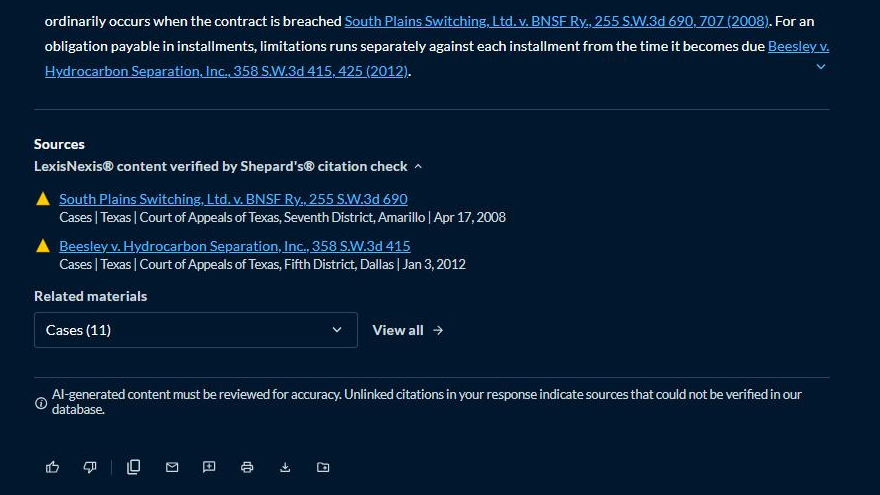
Lexis does put a note under every answer: “AI-generated content must be reviewed for accuracy.” I’ll give them credit for that. Click the download icon and you get this:
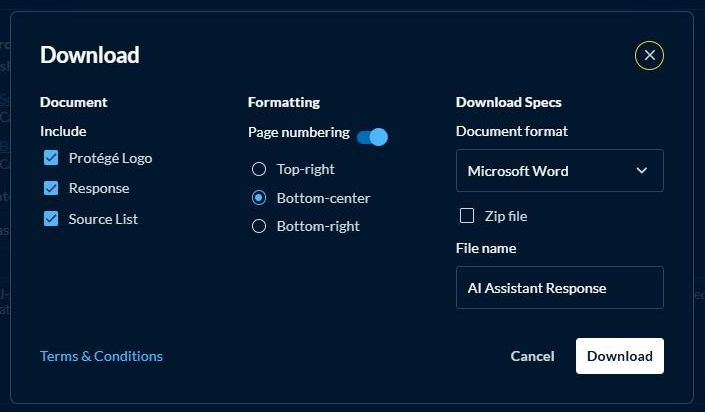
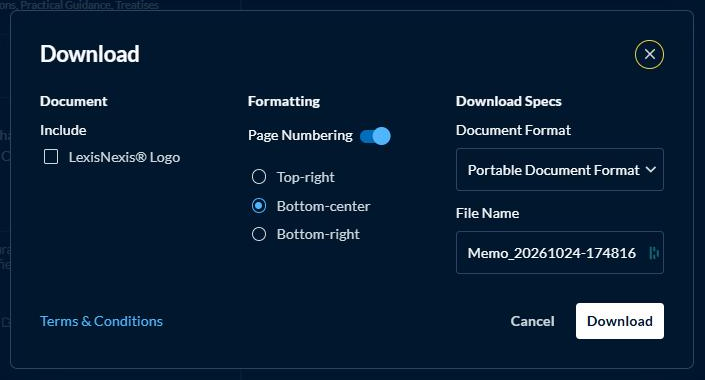
You can choose the logo, the page numbering, the format and the file name. There is no mention of AI labels anywhere in that box. The Word file that comes out has the five properties. Pick PDF instead and you get the same five, carried over into the PDF’s own document properties, where any PDF metadata viewer will show them. The Zip checkbox just wraps the stamped Word file in a zip.
The test that bothered me most
Protégé has a drafting editor it calls the canvas. I wanted to know whether the stamp tracks what the AI actually wrote, or whether it just gets slapped on anything that leaves the building.
The canvas won’t open without a prompt, so I asked Protégé to create a blank document titled “Human Test Memo” and to leave the body empty. It gave me a page with that title on it and nothing else. Then I turned off Track Changes, deleted everything on the page (including the AI’s three-word title), and typed this myself, one keystroke at a time:
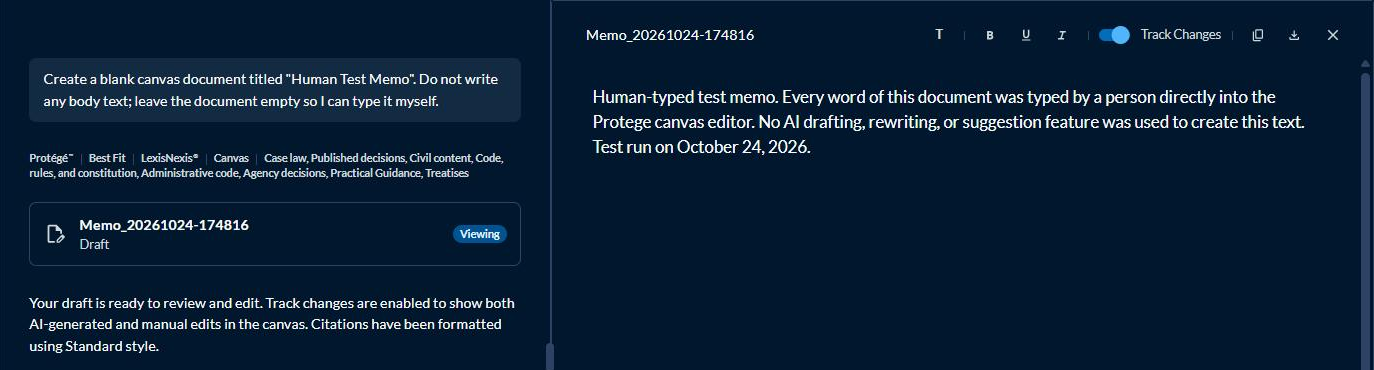
I didn’t use a prompt, a rewrite button or a suggestion along the way. Protégé clearly knew a person had edited the draft, because the card in the chat updated to “Edited on Oct 24, 12:51PM,” and the chat note right under it says track changes “show both AI-generated and manual edits in the canvas.”
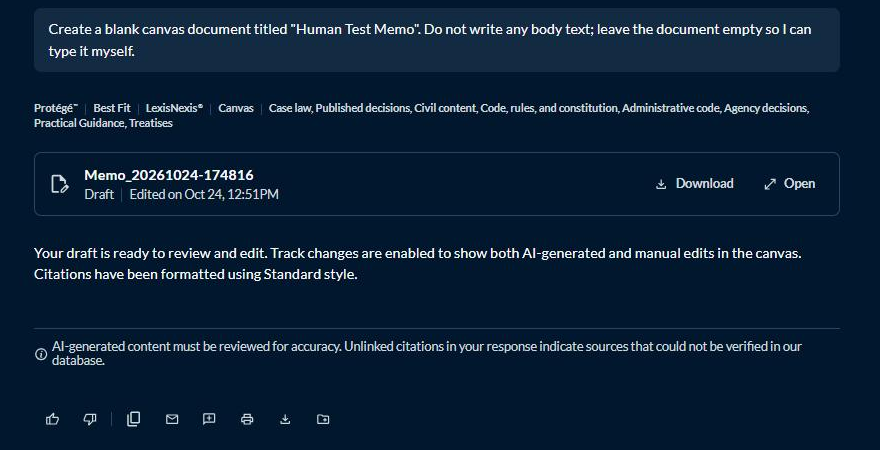
Then I downloaded it.
Every word in that file was typed by me, and the file says “AI-Generated” and “This content was generated by an artificial intelligence system.” The PDF says the same thing. (The properties table at the top of the post comes from this exact file.)
I can almost hear the product meeting where this got decided. I’m sure nobody said, “You know what our customers’ human-written memos really need? A hidden certificate saying a robot wrote them.” And yet that’s exactly how the feature behaves right now.
A few other things I found
The “AIGenerationTimestamp” is the download time. I pulled an NDA that Protégé drafted on October 18, downloaded it on October 24, and the file says it was generated on October 24. If anyone ever relies on that field to build a timeline, they’ll get it wrong.
Copy and paste carries nothing. I captured what the copy buttons put on the clipboard, and it’s plain text and simple HTML with no marker of any kind. So the label only follows the people who click Download, and anyone who pastes the answer into Word skips it entirely.
Skills mode gets stamped too. I typed a three-row table of state limitations periods into the prompt myself and asked Protégé’s Skills to give it back to me as an Excel workbook, a Word document and a PowerPoint deck.
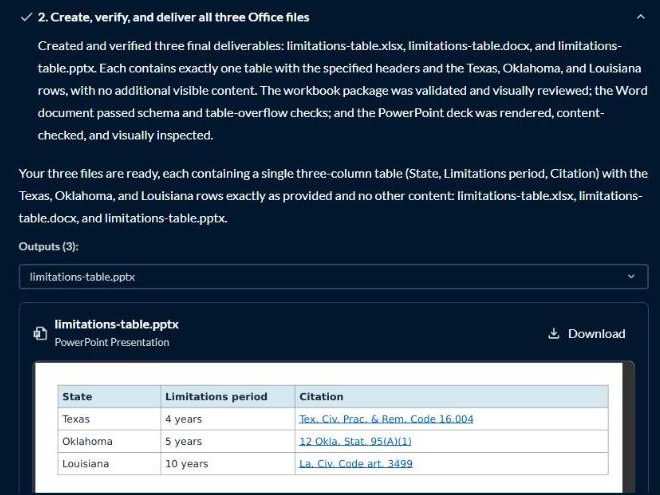
All three files carry the same five properties. These downloads come straight from an Amazon storage bucket instead of Lexis’s normal delivery service, so they skip the usual Lexis tracking fields, and the stamp gets written once when the Skill finishes the file. (The Skill also decided on its own to move my citations onto a second sheet as footnote numbers, which is a story for another day.)
Then there’s Review tables, and this one surprised me. I built a review table from a short fictional lease, added an AI column asking for the monthly rent, and downloaded it to Excel with the AI’s reasoning and source citations included. Every cell in that column was written by Protégé. The file has no AI properties and no Lexis tracking fields. I can’t think of a better illustration of the problem: the most AI-heavy file I downloaded all day is the one with no label on it.
For a control, I pulled a case (South Plains Switching v. BNSF, 255 S.W.3d 690) from regular Lexis+ and downloaded it in every format the dialog offers: PDF, Word, WordPerfect, RTF and CaseMap. None of them had any AI properties, including the PDF, which tells me the stamp depends on whether the file came out of Protégé, whatever the format.
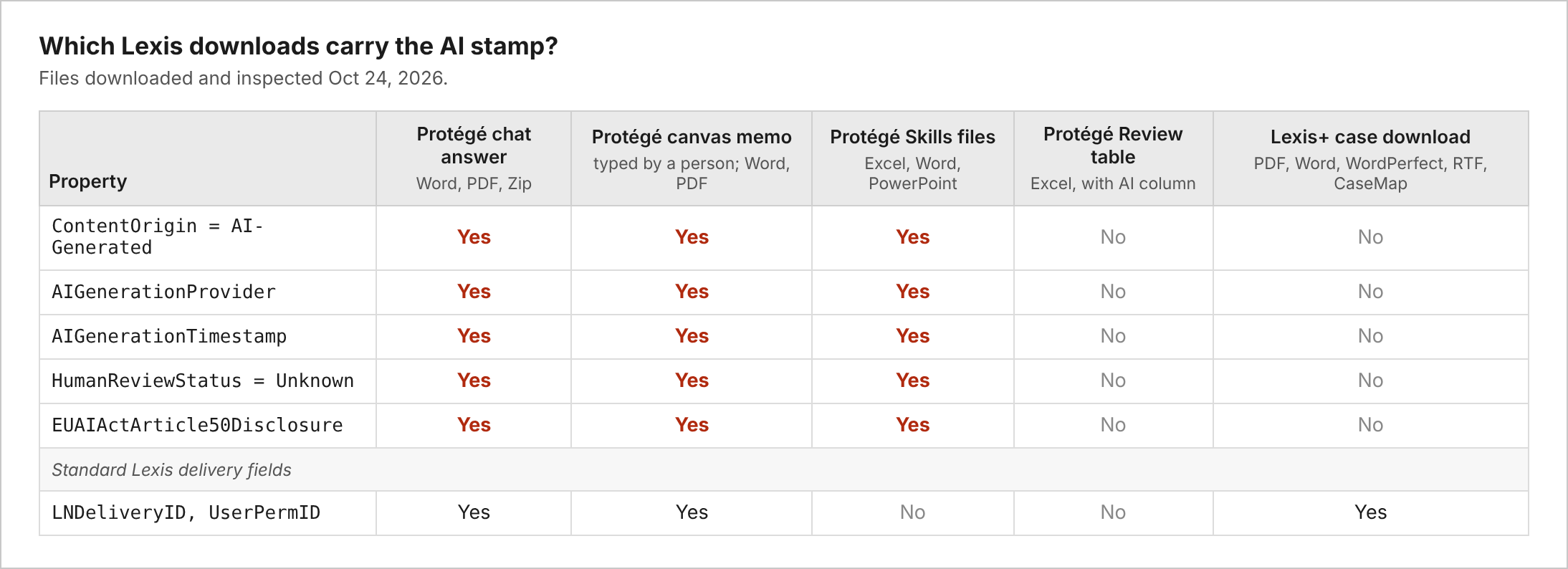
In the interest of fairness, there’s one thing I want to head off before someone else raises it. The Protégé files also carry Lexis delivery fields, including one called UserPermID that ties the file to your Lexis user account. Those fields show up on the plain Lexis+ case download too, and Lexis already prints your name in the footer of case downloads. They are not part of this new AI stamp, and I’m not going to pretend they are.
Why Lexis is probably doing this
I get it. Article 50 of the EU AI Act took effect on August 2, 2026, and it requires providers of generative AI to mark their output “in a machine-readable format and detectable as artificially generated.” Systems that were already on the market get until December 2, 2026 to comply with the marking piece. That August 20 file fits the timeline, coming a few weeks after the rule took effect. The rule reaches U.S. vendors whenever their output is used in the EU, and Lexis has no way of knowing which of my downloads might end up attached to an email to Frankfurt. The Commission’s Code of Practice even names metadata as one of the techniques it expects to see.
My read is that Lexis is doing something the EU requires of it and simply skipped the step where customers get told.
Where it goes wrong
The first problem is that nobody at Lexis/RELX told us. This is a change to the files our lawyers send to clients, courts and opposing counsel. A release note listing five property names would have taken someone an afternoon.
Then there’s the way the label gets applied. It rides on the download button and goes onto whatever happens to be in the file. The EU rule itself carves out AI tools that only do “standard editing” or don’t substantially alter the input. A memo a person typed from scratch is a lot further from AI output than that. And the Review tables export shows the label can miss real AI output entirely, depending on which button you click.
The review status bugs me the most, because “Unknown – not verified” never changes. A lawyer can review, edit and sign off on a draft in the canvas, and the downloaded file will still tell anyone who looks that nobody reviewed it, which is a claim about our process that we never made.
And these properties travel. Build your brief from a Protégé download, and the hidden “AI-Generated, not verified” label goes along to whoever receives it. A good metadata scrubbing step will catch it, assuming the document goes through one before it leaves.
How Anthropic handled the same rule
Lexis isn’t the only vendor dealing with this rule. In August, Anthropic announced that text from Claude models launched after August 2 would carry an invisible statistical watermark, built on the SynthID research Google published in 2024. Anthropic also pointed to the EU AI Act, and it chose to apply the watermark worldwide. The reaction was loud. Dozens of users on X posted screenshots of their canceled subscriptions. John Gruber called the word-choice nudging behind it “a perversion of writing.” Others worried that a lawyer who only used Claude to tighten up a brief could have the whole thing flagged as AI-written, which is pretty much what happened to my hand-typed memo in the Protégé canvas. Anthropic told reporters it saw no measurable rise in cancellations and stuck with the plan.
The two approaches work differently. Anthropic’s mark lives in the word choices themselves, so it survives a copy and paste, and Anthropic says it will offer an API that checks text for it. Lexis’s stamp is five lines of metadata that disappear the moment someone copies the text out or runs the file through a scrubber. The bigger difference for me is disclosure. Anthropic announced the watermark, published a technical explanation of how it works, and took the criticism in public. Lexis has been stamping files since at least August 20, and its customers are finding out by opening the document properties themselves.
What I’d like to see from Lexis
I’d start with a public release note that names the properties and says when they started. I’d also like the stamp to use the canvas’s own record of AI versus manual edits, since the canvas clearly already knows the difference, and I’d like the review status to update when a named user signs off. If there’s a reason Lexis can’t give firms with no EU exposure an admin setting for this, I’d like to hear what it is.
In the meantime, firms should check whether their metadata cleaning tools catch custom document properties, and should start asking every AI vendor they license whether exports are being stamped. I’d be surprised if Lexis is the only one with a December 2 deadline on the calendar.
So here’s my question for my fellow innovation and KM folks: if one of your AI vendors started writing statements about your firm’s work product into the files you send to clients, how long would it take your firm to notice? It took me two months to find out that Lexis did it.